A dedicated emergency stop for high-force sim racing setups.
The MOZA E-Stop Switch gives you a physical, easy-to-reach button for stopping force feedback or cutting base power, depending on how it is connected. It is a small accessory, but in a powerful direct drive setup it adds a very real layer of control, confidence and peace of mind.
Stop the force feedback instead of fighting the wheel.
A strong wheel base can move quickly when a game crashes, a car resets, a profile is wrong or someone needs to reach into the cockpit. The E-Stop Switch adds a dedicated hardware control point, so you do not need to search through software menus or grab the wheel under load.
A dedicated button for stopping force feedback or cutting base power depending on connection mode.
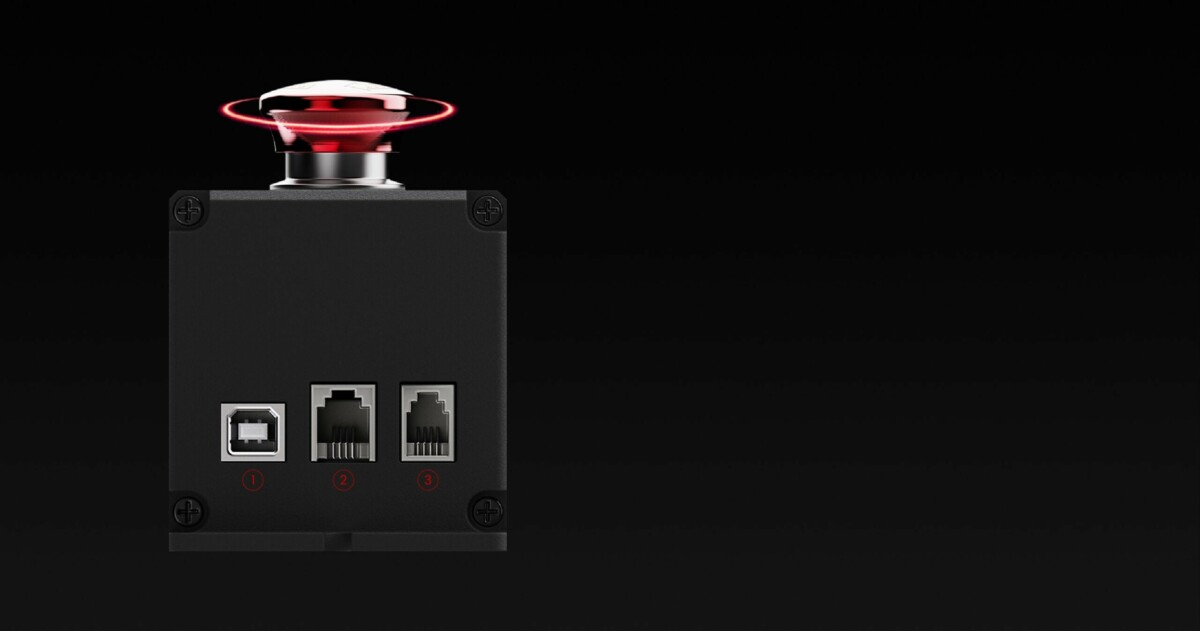
MOZA lists USB, RJ11 and RJ9 connection options for different protection modes.
Especially useful in higher-force simulator setups where a fast stop control makes sense.
Keep the control point visible and reachable during testing, tuning and racing.
Choose the mode that matches how you connect it.
The behavior changes depending on the cable and port used. That distinction matters: two modes temporarily disable force feedback, while the E-STOP port mode cuts power and requires the base to be powered on again.
Connect directly to the PC via USB. Pressing the switch deactivates force feedback, and force feedback is restored when the switch is released.
Connect to the DASH port on the base using an RJ11 cable with 6 contact pins. Pressing the switch deactivates force feedback and restores it on release.
Connect to the E-STOP port on the base using an RJ9 cable with 4 contact pins. Pressing the switch cuts power completely; after release, the base must be powered on again.
MOZA notes that some games may require a restart to restore force feedback after the full power-cut mode is used.
Soft FFB stop or full power cut.
Use USB or DASH connection when you want a temporary force feedback interruption that returns immediately after release. Use the E-STOP port mode when your compatible base supports it and you want the stricter behavior: the switch cuts power and the base is brought back manually.
PC connection for temporary force feedback interruption.
RJ11 connection path listed by MOZA for force feedback deactivation.
RJ9 connection to the dedicated E-STOP port for a complete power cut.
Confirm cable, port and game behavior before relying on a specific mode in a session.
MOZA E-Stop Switch specs.
| Product | MOZA E-Stop Switch |
|---|---|
| OCRacing SKU | RS063 |
| Official MOZA SKU | T05S050009A |
| Product type | Emergency stop switch / simulator safety control accessory |
| Connection modes | USB to PC, RJ11 to DASH port, RJ9 to E-STOP port |
| Mode 1 behavior | USB connection deactivates force feedback and restores it on release |
| Mode 2 behavior | RJ11 DASH connection deactivates force feedback and restores it on release |
| Mode 3 behavior | RJ9 E-STOP connection cuts power; base must be powered on again after release |
| Material | Aluminum alloy button and casing |
| Compatibility | MOZA simulator setups; available behavior depends on compatible ports |
| Product weight | MOZA listed variant weight: 0.5 kg |
| Barcode | 6973137270384 |


Reviews
There are no reviews yet